retrozinndev
Retrozinn's Hyprland Dots
Note
This is a WIP Aylur's GTK Shell version of my dots! Everything at the moment in
this shell is working flawlessly, you can try it out if you want to!
Want the stable dotfiles? Go to theryobranch!
My Hyprland Desktop Shell + Dotfiles that I keep improving almost everyday! 🤩 (i love doing this)
This repository includes a desktop shell made with GTK, using Astal and AGS + TypeScript. It really took me a lot of time to make this, so please star the repo if you like it! ⭐
✔️ What's included in this shell
- Pretty Top-Bar
- Apps button(basically the "start menu", opens the full-screen app launcher)
- Workspace indicator(contains icon of last used application on each)
- Focused Client(Window) information(title, class and icon)
- Clock(with date)
- Media(shows only when media is being played)
- Tray(Applications running in the background)
- Status (volume information, bluetooth, network and notification status)
- Control Center
- Volume Controls (Microphone and Speaker)
- Volume Mixer(per-app volume)
- Pages(the thing that shows up when you click the arrow on a tile)
- Bluetooth devices
- Network devices
- Night Light controls
- Tiles
- Screen Recording
- Bluetooth
- Night Light
- Network(wifi needs work, i don't have wifi in my machine)
- Don't Disturb(disables notification popups)
- Volume Controls (Microphone and Speaker)
- Center Window(clock, calendar + media management)
- Notifications with support for application actions + Notification History
- Localization(see 🌐 Internationalization for available languages)
- Application Runner with support for plugins (anyrun-like)
- Shell(
!): Run shell commands with the user shell - Media(
:): Control playing media - Search(
?): Search something on the internet with your default browser
- Shell(
- Gnome-like application runner(the fullscreen one)
- Support for your multiple monitors
🔘 TODO
Everything is done!! I'm just doing some polishing.
🌄 Screenshots


🎨 Colors
All the colors of the interface are dynamically generated from your wallpaper! This is possible by using pywal16 (fork of pywal), a cli tool to generate color schemes on the fly.
🖼️ Wallpapers
When you're at the Installation process, you can choose whether to install the wallpapers.
Or if you haven't, you can just create a directory ~/wallpapers in your home ~ and put images you want to use as wallpapers!
You can select any of the images inside ~/wallpapers by pressing SUPER + W or by accessing the
Control Center and clicking in the image icon on top.
ℹ️ Source
All wallpapers inside this repo are not made by me! You can find all sources inside the WALLPAPERS.md file.
⌨️ Binds
You can see pre-configured bindings in the Wiki/Bindings page!
🌐 Internationalization
This Shell supports i18n. Currently, it supports the following languages:
- English (United States), maintained by @retrozinndev
- Português (Brasil), maintained by @retrozinndev
Don't see your language here? You can contribute and make translations too!
To do so, fork this repository, translate your fork, then open a pull request to this repository, simple as that!
⚙️ Installation
See the Installation Guide on Wiki/Installation.
🎉 Tools
- Browser: Zen Browser
- Text Editor: Neovim, my config is here
- Terminal Emulator: Kitty
- Shell: Nushell
- See more on the wiki!
❗ Issues
Having issues? Please create a new Issue here, I'll be happy to help you out!
📜 License
This repo is licensed under the MIT License, project is made and maintained by retrozinndev.
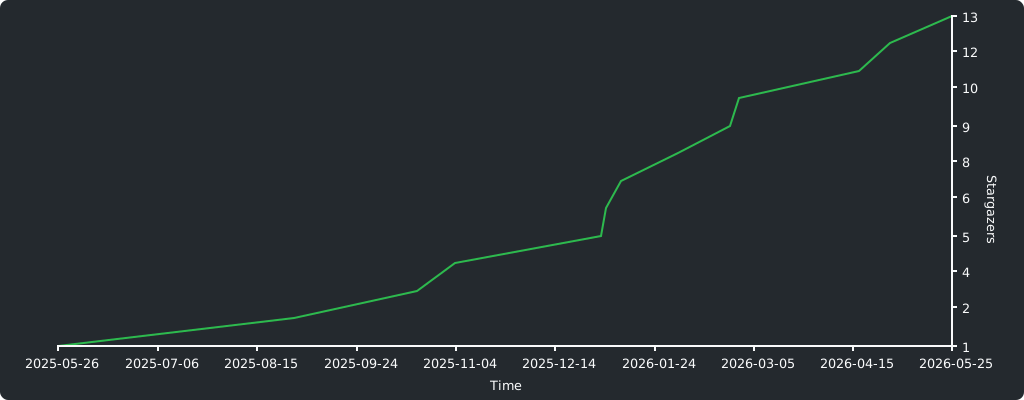
🌠 Stargazers
Thanks to everyone who starred my project! 💖