 João Dias
169 lines
6.9 KiB
Markdown
169 lines
6.9 KiB
Markdown
# colorshell
|
|
|
|
> [!note]
|
|
> My personal dotfiles are now on [retrozinndev/Hyprland-Dots](https://github.com/retrozinndev/Hyprland-Dots)
|
|
|
|
This is the repository for the colorshell desktop shell, made for Hyprland with [TypeScript], [GTK4], [AGS], [Gnim], and some of the [Astal] libraries.
|
|
|
|
It really took me a lot of time to make this, so please star the repo if you like it! :star:
|
|
|
|
## 🌄 Screenshots
|
|

|
|

|
|

|
|

|
|
|
|
## 🎨 Colors
|
|
All the shell colors are dynamically generated from your wallpaper!
|
|
|
|
This is possible by using [pywal16], a fork of the archived [pywal](https://github.com/dylanaraps/pywal) project.
|
|
It's a cli tool to generate color schemes from an image.
|
|
|
|
## 🖼️ Wallpapers
|
|
|
|
These are not included in the shell anymore, because the repository was getting too big in size.
|
|
So you'll have to add it in your own.
|
|
|
|
You can define the `WALLPAPERS` variable in your hyprland user configuration to your wallpapers folder,
|
|
or create the `~/wallpapers` directory and put your wallpapers there.
|
|
|
|
Also, you can select any of the images inside `~/wallpapers` by pressing
|
|
<kbd>SUPER</kbd> + <kbd>W</kbd> or by accessing the Control Center and clicking in the image
|
|
icon on top.
|
|
|
|
## ✨ Features
|
|
<details>
|
|
|
|
- Pretty Top-Bar
|
|
- Apps(basically the "start menu", opens the full-screen app launcher)
|
|
- Workspaces indicator
|
|
- Focused Client(window) information(title, class and icon)
|
|
- Clock(with date)
|
|
- Media
|
|
- Change current player by scrolling on top of the widget or by opening the
|
|
Center Window and scrolling the player
|
|
- Only available when there's media playing
|
|
- Tray(Applications running in the background)
|
|
- Status (volume information, bluetooth, network and notification status)
|
|
- Control Center
|
|
- Volume Controls (Microphone and Speaker)
|
|
- Volume Mixer(per-app volume)
|
|
- Pages(the thing that shows up when you click the arrow on a tile)
|
|
- Bluetooth devices
|
|
- Network devices
|
|
- Night Light controls
|
|
- Tiles
|
|
- Screen Recording
|
|
- Bluetooth
|
|
- Night Light
|
|
- Network(wifi needs work, i don't have wifi in my machine)
|
|
- Don't Disturb(disables notification popups)
|
|
- Center Window(clock, calendar + media management)
|
|
- Notifications with support for application actions + Notification History
|
|
- Localization(see [🌐 Internationalization](#-internationalization) for available languages)
|
|
- Application Runner with support for plugins ([anyrun](https://github.com/anyrun-org/anyrun)-like)
|
|
- Shell(`!`): Run shell commands with the user shell
|
|
- Clipboard(`>`): Search through your clipboard history
|
|
- Wallpapers(`#`): Search and select to change wallpaper
|
|
- Media(`:`): Control playing media
|
|
- Search(`?`): Search something on the internet with your default browser
|
|
- Support for your multiple monitors
|
|
- Dynamic support for [UWSM](https://github.com/Vladimir-csp/uwsm)(apps will use uwsm if current session is using it)
|
|
</details>
|
|
|
|
## ⌨️ Binds
|
|
You can see default bindings and usage information on the [Wiki/Usage] page!
|
|
|
|
## 🌐 Internationalization
|
|
Colorshell supports i18n! The shell automatically matches the shell language with the system's, if available. <br>
|
|
Currently, there's support for the following languages:
|
|
- **English** (English, United States), maintained by [@retrozinndev](https://github.com/retrozinndev)
|
|
- **Português** (Portuguese, Brazil), maintained by [@retrozinndev](https://github.com/retrozinndev)
|
|
- **Русский** (Russian), maintained by [@NotMephisto](https://github.com/NotMephisto)
|
|
|
|
Don't see your language here? You can contribute and make translations too! <br>
|
|
You can do so by forking this repository, translating the shell in your fork and then opening a pull request to this repository, simple as that!
|
|
(I'll create a more detailed guide for that soon)
|
|
|
|
## ⚙️ Installation
|
|
See the Installation Guide on [Wiki/Installation].
|
|
|
|
## 🛠️ Development
|
|
This project uses `pnpm` to manage packages and running scripts.
|
|
To build the shell, run a development build or make a release build, you can use the project's integrated scripts.<br>
|
|
The most complicated ones have a help flag, so you can learn from there.
|
|
|
|
### Dependencies
|
|
These are development-only dependencies(by package name on AUR):
|
|
- `aylurs-gtk-shell-git`
|
|
- `libastal-meta`
|
|
|
|
Plus, you also need the packages listed in [Wiki/Dependencies]!
|
|
|
|
### Building
|
|
In a common build, the shell's gresource(icons and sass) will be targeted to the build output directory by default.
|
|
If you want to ship it, you likely want to use the `pnpm build:release` command.
|
|
```zsh
|
|
pnpm build -d # remove the -d flag if you don't want a development build
|
|
```
|
|
If you want to ship the build(or install it on your local machine), you'll likely prefer a release build:
|
|
(the `build:release` command targets the gresource to `$XDG_DATA_HOME/colorshell/resources.gresource` by default)
|
|
```zsh
|
|
pnpm build:release
|
|
```
|
|
Don't forget to install the gresource to the actual target directory! Or else it'll not find the resource file and will fail
|
|
to load custom assets.<br>
|
|
Also, the environment variables are only actually used at runtime! It's passed as a literal string in the bash
|
|
variable format, then when the shell runs, it understands that it's an environment variable and replaces it with it's value.
|
|
|
|
### Testing/Running the project
|
|
```zsh
|
|
pnpm dev
|
|
```
|
|
or if you actually only want to run the current build instead of building again:
|
|
```
|
|
pnpm start
|
|
```
|
|
|
|
## ❗ Issues
|
|
Having issues? Please create a [new Issue] here, I'll be happy to help you out!
|
|
|
|
## 📜 License
|
|
This repo is licensed under the [MIT License], project is made and maintained by [retrozinndev](https://github.com/retrozinndev).
|
|
|
|
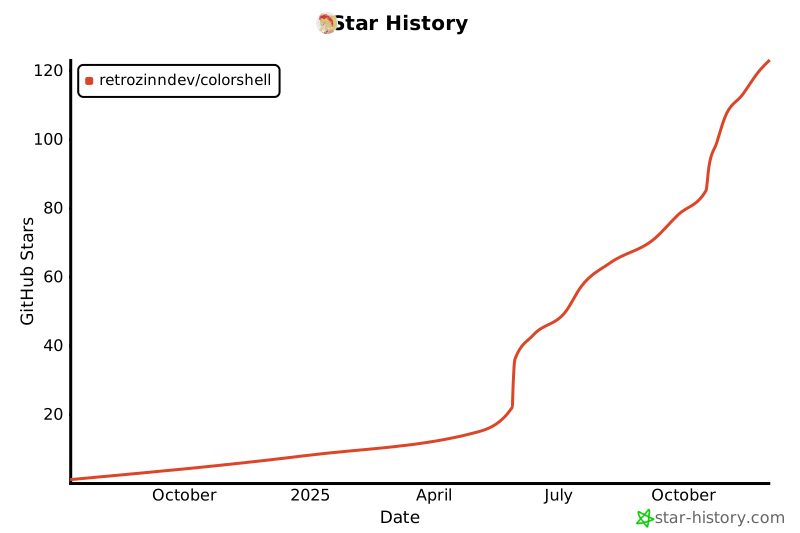
## 🌠 Stargazers
|
|
<div align="center">
|
|
|
|
[](https://www.star-history.com/#retrozinndev/colorshell&Date)
|
|
<br>
|
|
<p align="center">Thanks to everyone who starred my project! 💖</p>
|
|
</div>
|
|
|
|
<!-- References of other projects -->
|
|
[pywal16]: https://github.com/eylles/pywal16
|
|
[zen browser]: https://zen-browser.app
|
|
[neovim]: https://neovim.io
|
|
[nushell]: https://nushell.sh
|
|
[kitty]: https://sw.kovidgoyal.net/kitty
|
|
[ags]: https://aylur.github.io/ags
|
|
[gnim]: https://aylur.github.io/gnim
|
|
[astal]: https://aylur.github.io/astal
|
|
[typescript]: https://typescriptlang.org
|
|
[gtk4]: https://www.gtk.org
|
|
[gtk]: https://www.gtk.org
|
|
|
|
<!-- Web refs -->
|
|
[mit license]: https://en.wikipedia.org/wiki/MIT_License
|
|
|
|
<!-- Tabs -->
|
|
[wiki]: https://github.com/retrozinndev/colorshell/wiki
|
|
[issues]: https://github.com/retrozinndev/colorshell/issues
|
|
|
|
<!-- Wiki Pages -->
|
|
[wiki/dependencies]: https://github.com/retrozinndev/colorshell/wiki/Dependencies
|
|
[wiki/usage]: https://github.com/retrozinndev/colorshell/wiki/Usage
|
|
[wiki/installation]: https://github.com/retrozinndev/colorshell/wiki/Installation
|
|
|
|
<!-- Actions -->
|
|
[new issue]: https://github.com/retrozinndev/colorshell/issues/new
|