# colorshell > [!note] > My personal dotfiles are now on [retrozinndev/Hyprland-Dots](https://github.com/retrozinndev/Hyprland-Dots) This is the repository for the colorshell desktop shell, made for Hyprland with [TypeScript], [GTK4], [AGS], [Gnim], and some of the [Astal] libraries. It really took me a lot of time to make this, so please star the repo if you like it! :star: ## ๐ŸŒ„ Screenshots
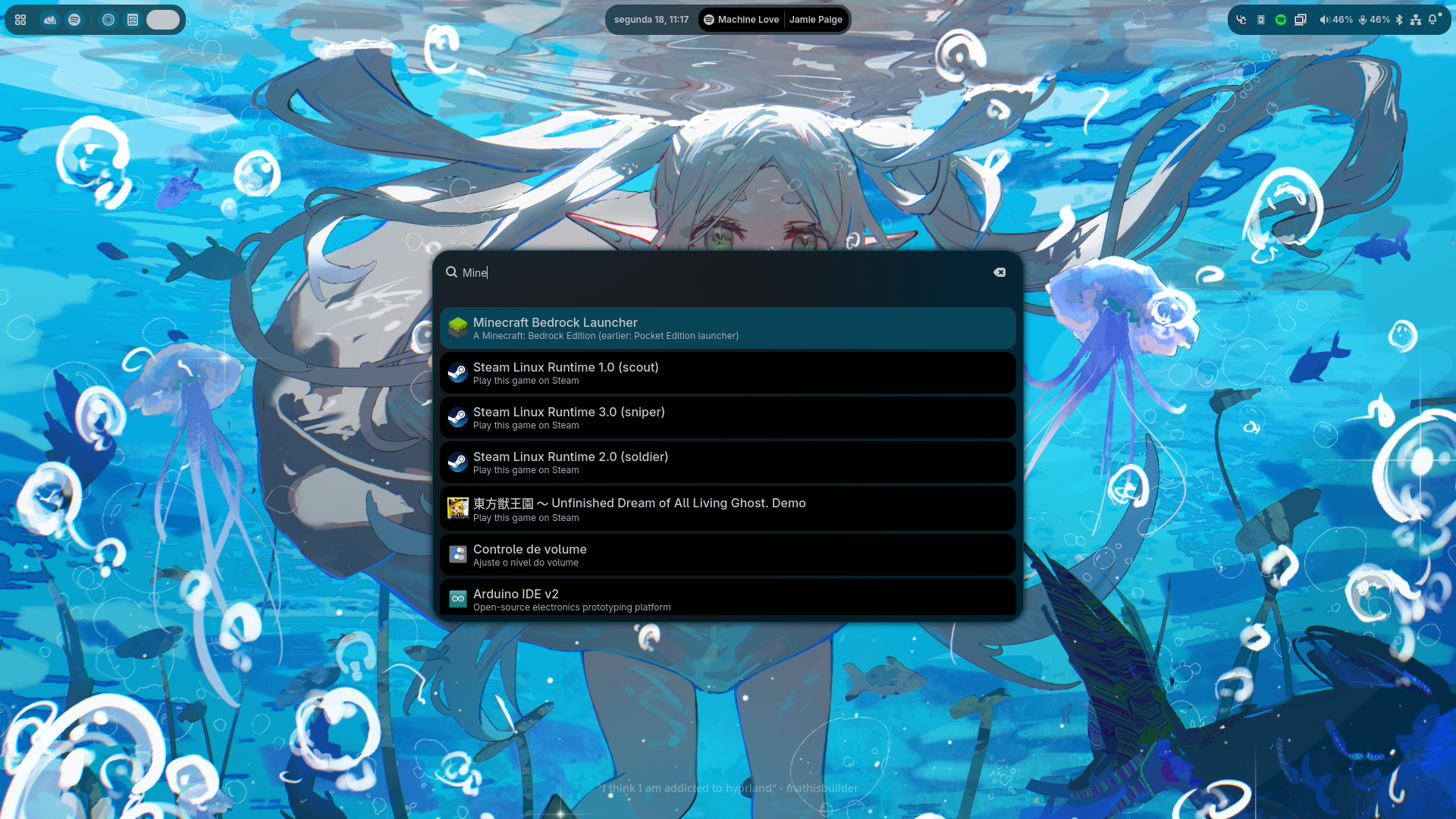
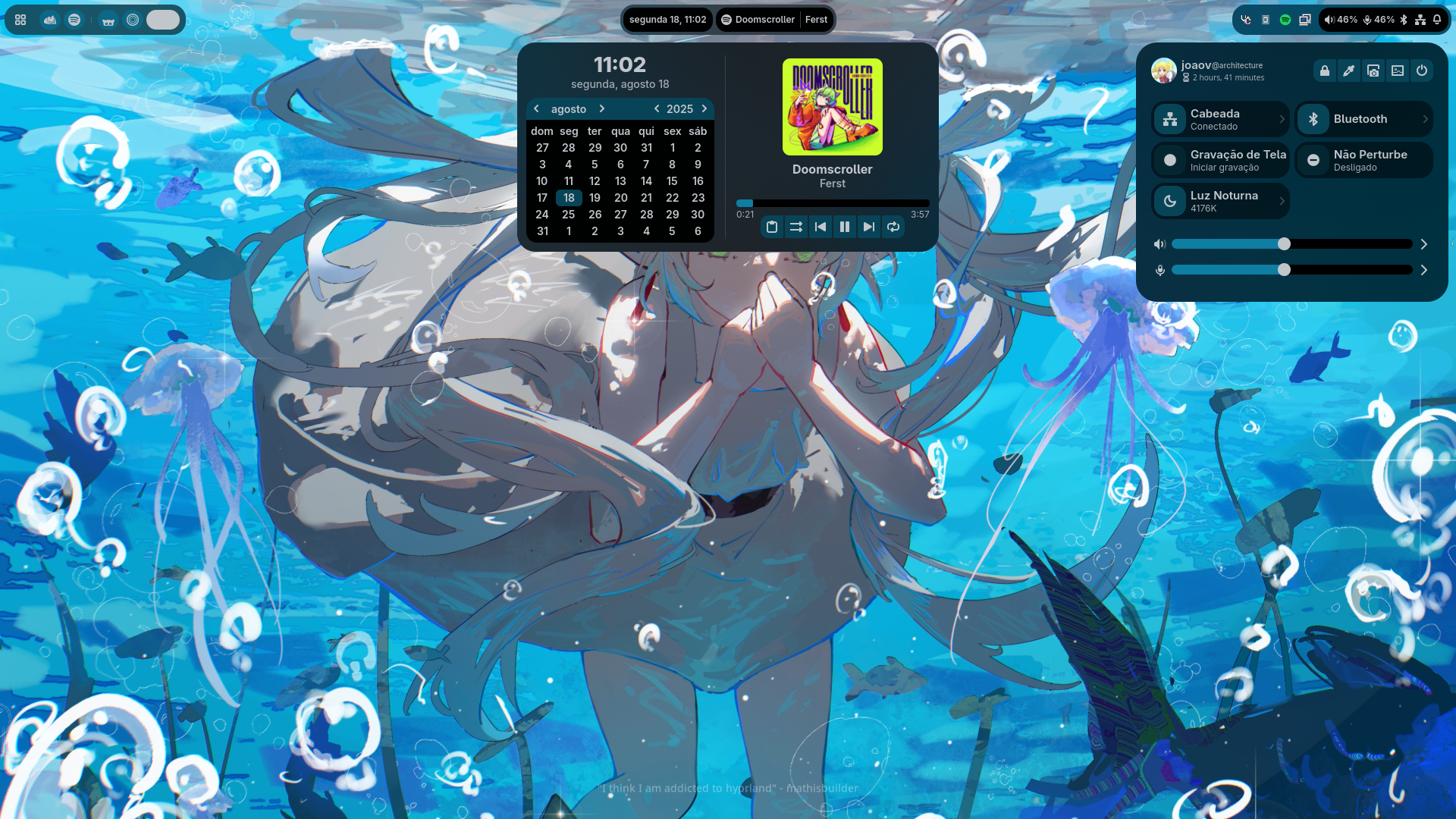
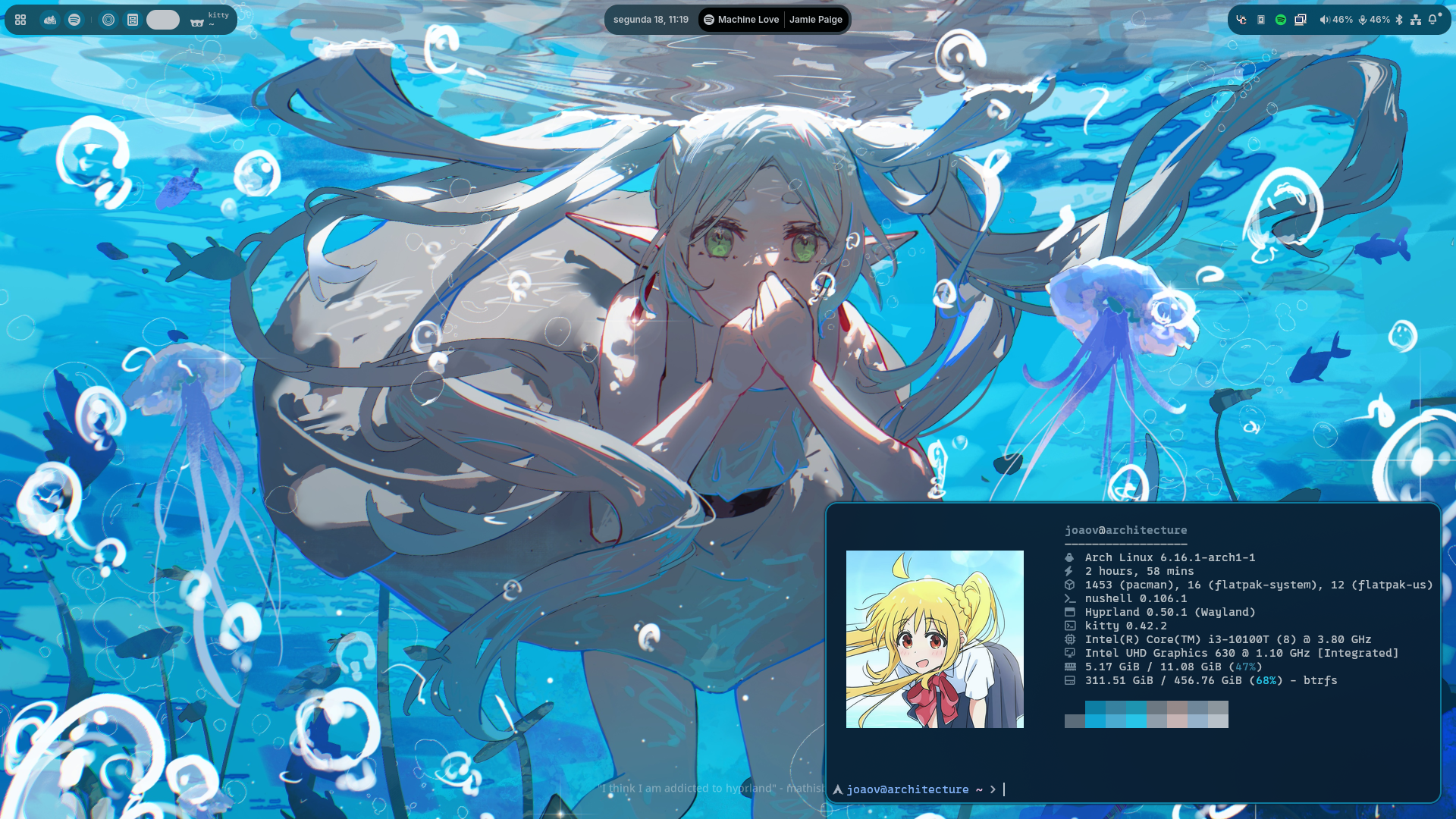
desktop Runner Control Center & Center Window Kitty

more screenshots on [`repo/shots`](repo/shots)

## ๐ŸŽจ Colors All the shell colors are dynamically generated from your wallpaper! This is possible by using [pywal16], a fork of the archived [pywal](https://github.com/dylanaraps/pywal) project. It's a cli tool to generate color schemes from an image. ## ๐Ÿ–ผ๏ธ Wallpapers These are not included in the shell anymore, because the repository was getting too big in size. So you'll have to add it in your own. You can define the `WALLPAPERS` variable in your hyprland user configuration to your wallpapers folder, or create the `~/wallpapers` directory and put your wallpapers there. Also, you can select any of the images inside `~/wallpapers` by pressing SUPER + W or by accessing the Control Center and clicking in the image icon on top. ## โœจ Features
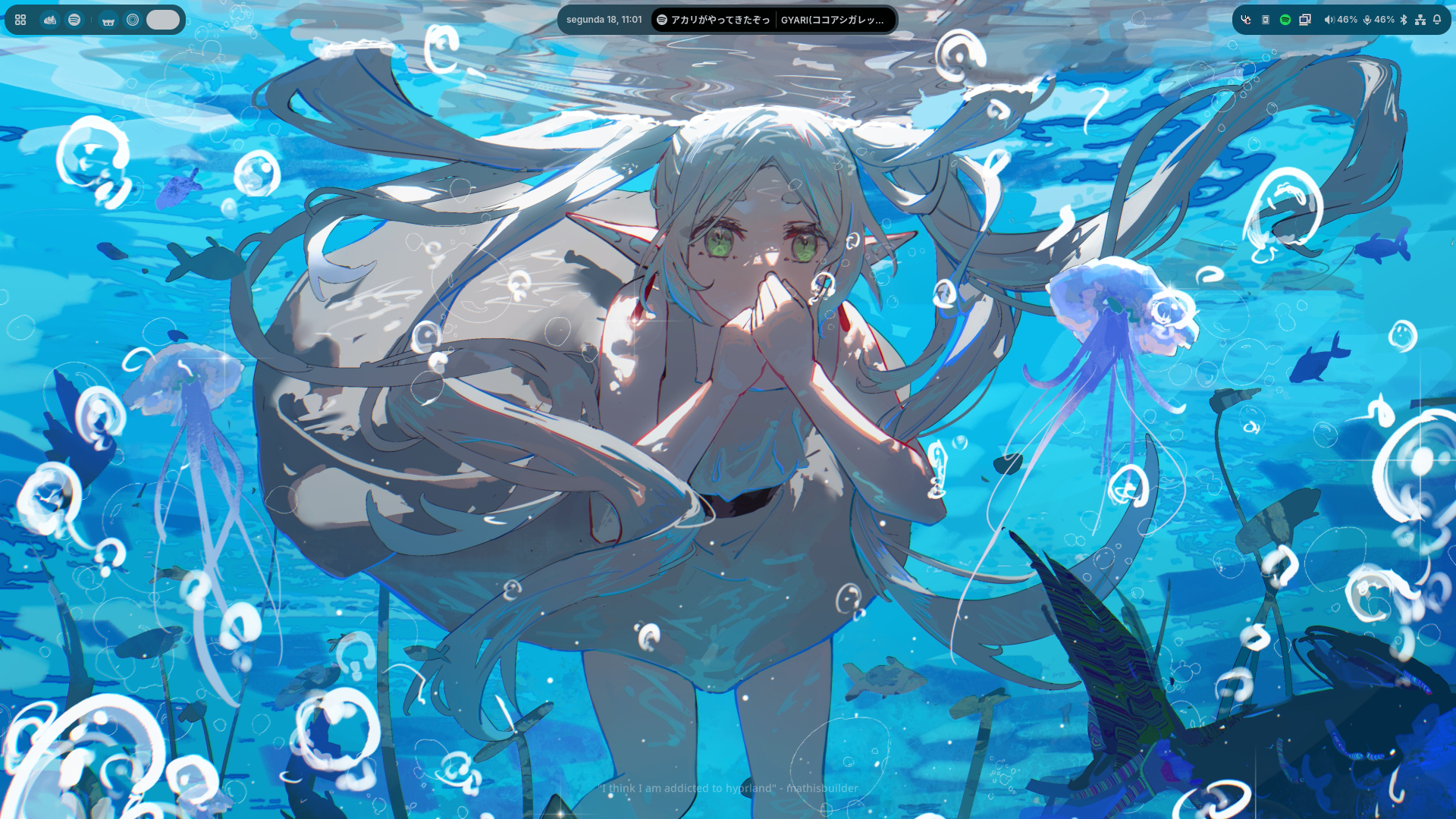
- Pretty Top-Bar - Apps(basically the "start menu", opens the full-screen app launcher) - Workspaces indicator - Focused Client(window) information(title, class and icon) - Clock(with date) - Media - Change current player by scrolling on top of the widget or by opening the Center Window and scrolling the player - Only available when there's media playing - Tray(Applications running in the background) - Status (volume information, bluetooth, network and notification status) - Control Center - Volume Controls (Microphone and Speaker) - Volume Mixer(per-app volume) - Pages(the thing that shows up when you click the arrow on a tile) - Bluetooth devices - Network devices - Night Light controls - Tiles - Screen Recording - Bluetooth - Night Light - Network(wifi needs work, i don't have wifi in my machine) - Don't Disturb(disables notification popups) - Center Window(clock, calendar + media management) - Notifications with support for application actions + Notification History - Localization(see [๐ŸŒ Internationalization](#-internationalization) for available languages) - Application Runner with support for plugins ([anyrun](https://github.com/anyrun-org/anyrun)-like) - Shell(`!`): Run shell commands with the user shell - Clipboard(`>`): Search through your clipboard history - Wallpapers(`#`): Search and select to change wallpaper - Media(`:`): Control playing media - Search(`?`): Search something on the internet with your default browser - Support for your multiple monitors - Dynamic support for [UWSM](https://github.com/Vladimir-csp/uwsm)(apps will use uwsm if current session is using it)
## โŒจ๏ธ Binds You can see default bindings and usage information on the [Wiki/Usage] page! ## ๐ŸŒ Internationalization Colorshell supports i18n! The shell automatically matches the shell language with the system's, if available.
Currently, there's support for the following languages: - **English** (English, United States), maintained by [@retrozinndev](https://github.com/retrozinndev) - **Portuguรชs** (Portuguese, Brazil), maintained by [@retrozinndev](https://github.com/retrozinndev) - **ะ ัƒััะบะธะน** (Russian), maintained by [@NotMephisto](https://github.com/NotMephisto) Don't see your language here? You can contribute and make translations too!
You can do so by forking this repository, translating the shell in your fork and then opening a pull request to this repository, simple as that! (I'll create a more detailed guide for that soon) ## โš™๏ธ Installation See the Installation Guide on [Wiki/Installation]. ## ๐Ÿ› ๏ธ Development This project uses `pnpm` to manage packages and running scripts. To build the shell, run a development build or make a release build, you can use the project's integrated scripts.
The most complicated ones have a help flag, so you can learn from there. ### Dependencies These are development-only dependencies(by package name on AUR): - `aylurs-gtk-shell-git` - `libastal-meta` Plus, you also need the packages listed in [Wiki/Dependencies]! ### Building In a common build, the shell's gresource(icons and sass) will be targeted to the build output directory by default. If you want to ship it, you likely want to use the `pnpm build:release` command. ```zsh pnpm build -d # remove the -d flag if you don't want a development build ``` If you want to ship the build(or install it on your local machine), you'll likely prefer a release build: (the `build:release` command targets the gresource to `$XDG_DATA_HOME/colorshell/resources.gresource` by default) ```zsh pnpm build:release ``` Don't forget to install the gresource to the actual target directory! Or else it'll not find the resource file and will fail to load custom assets.
Also, the environment variables are only actually used at runtime! It's passed as a literal string in the bash variable format, then when the shell runs, it understands that it's an environment variable and replaces it with it's value. ### Testing/Running the project ```zsh pnpm dev ``` or if you actually only want to run the current build instead of building again: ``` pnpm start ``` ## โ— Issues Having issues? Please create a [new Issue] here, I'll be happy to help you out! ## ๐Ÿ“œ License This repo is licensed under the [MIT License], project is made and maintained by [retrozinndev](https://github.com/retrozinndev). ## ๐ŸŒ  Stargazers
Star History Chart

Thanks to everyone who starred my project! ๐Ÿ’–

[pywal16]: https://github.com/eylles/pywal16 [zen browser]: https://zen-browser.app [neovim]: https://neovim.io [nushell]: https://nushell.sh [kitty]: https://sw.kovidgoyal.net/kitty [ags]: https://aylur.github.io/ags [gnim]: https://aylur.github.io/gnim [astal]: https://aylur.github.io/astal [typescript]: https://typescriptlang.org [gtk4]: https://www.gtk.org [gtk]: https://www.gtk.org [mit license]: https://en.wikipedia.org/wiki/MIT_License [wiki]: https://github.com/retrozinndev/colorshell/wiki [issues]: https://github.com/retrozinndev/colorshell/issues [wiki/dependencies]: https://github.com/retrozinndev/colorshell/wiki/Dependencies [wiki/usage]: https://github.com/retrozinndev/colorshell/wiki/Usage [wiki/installation]: https://github.com/retrozinndev/colorshell/wiki/Installation [new issue]: https://github.com/retrozinndev/colorshell/issues/new